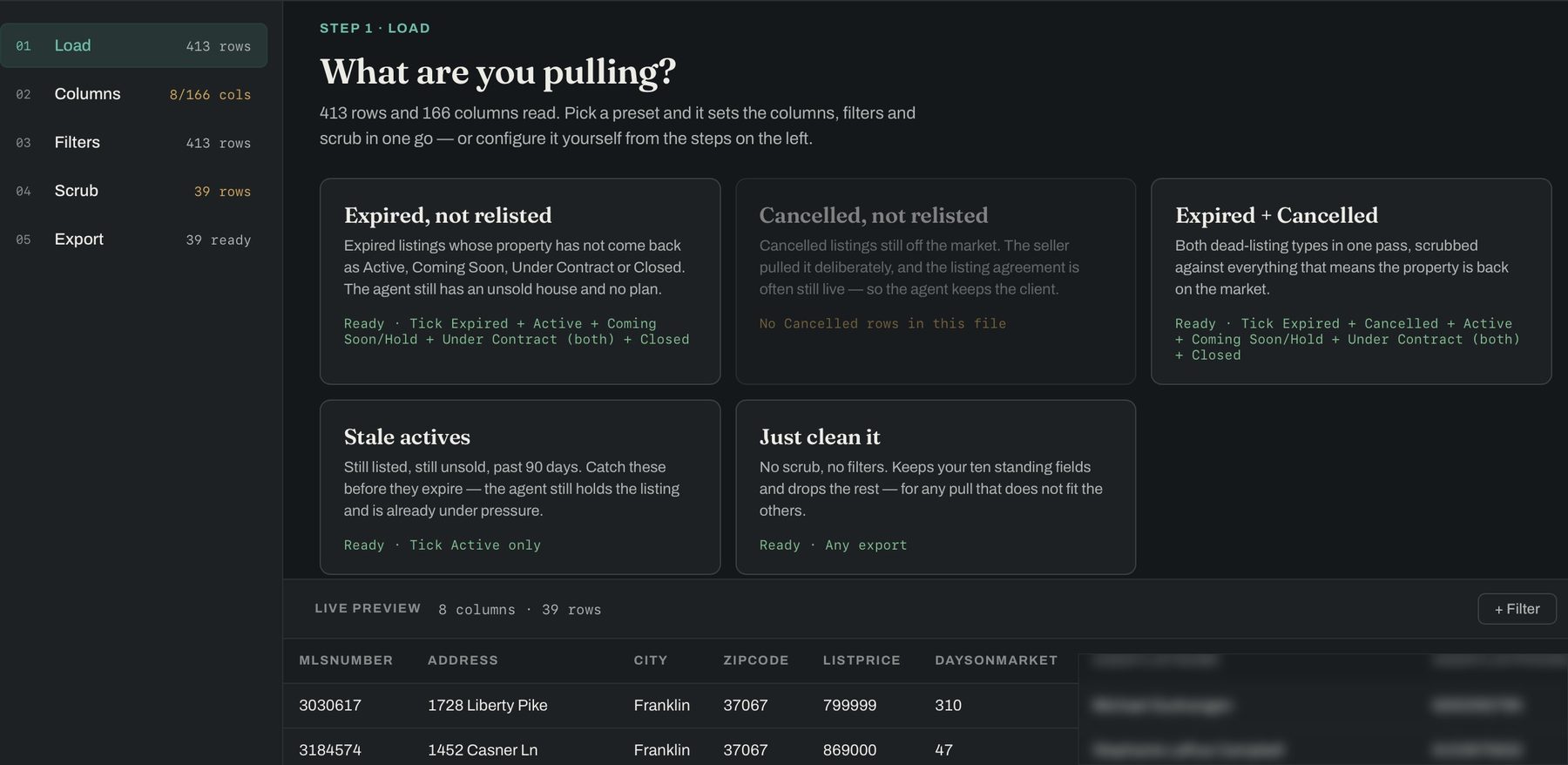
Step one — a real RealTracs pull. 413 rows and 166 columns, read in your browser. Agent contact details blurred.
166 columns come out of a single pull. About ten are worth keeping. Your MLS decides which ones it hands you, and it isn't asking.
Step one — a real RealTracs pull. 413 rows and 166 columns, read in your browser. Agent contact details blurred.
Pull Active and Expired in one export. List Rails matches every expired listing against every live one — the address and city, and the MLS number — and scrubs it against a relist, a sale or coming soon.
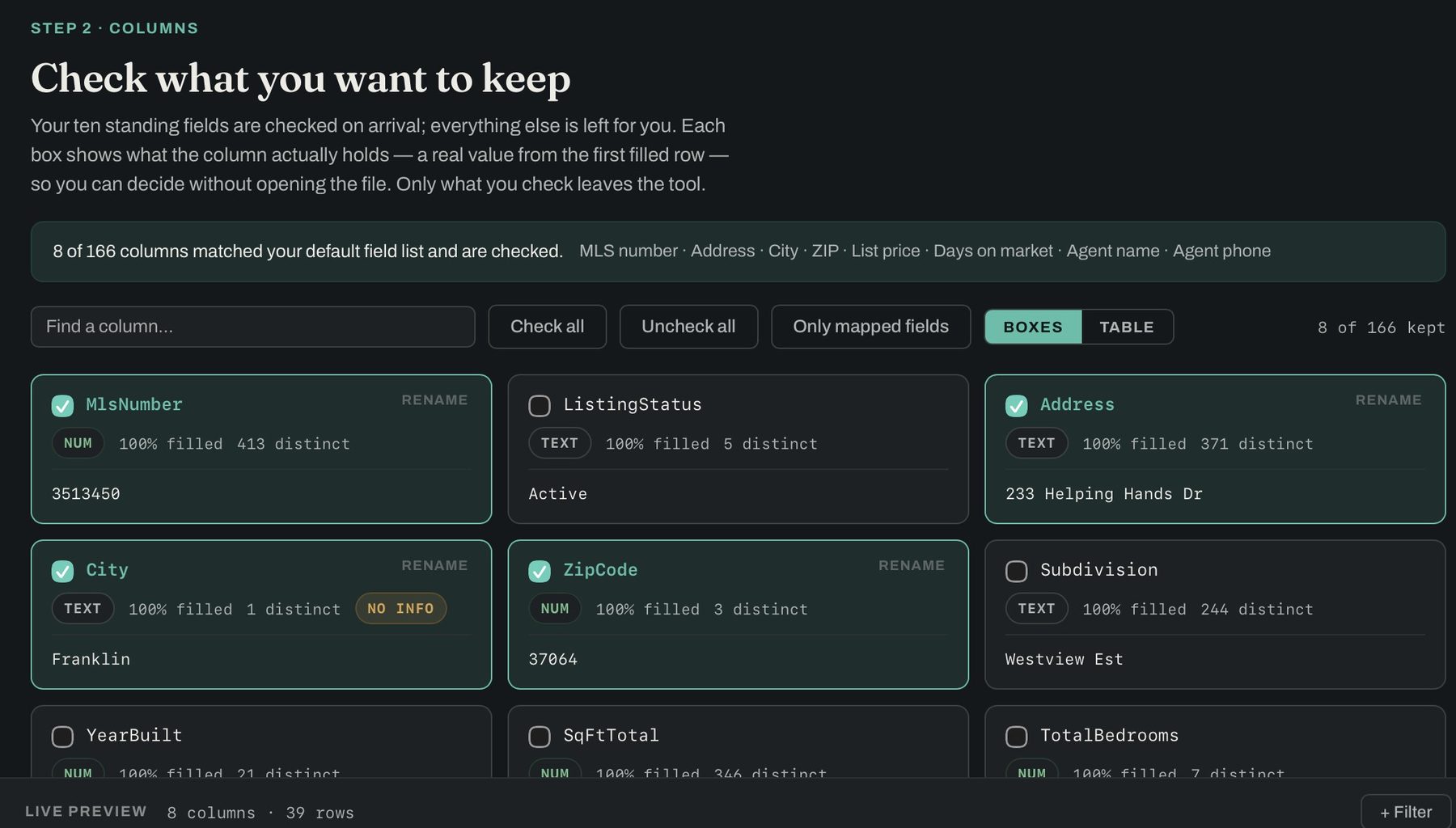
Step two — 8 of 166 columns matched your standing fields. The other 158 never leave with the file.
Unit 4 and Unit 6 at the same address are two different sellers. #8 and Unit 8 are the same one.
Pending, Under Contract, Coming Soon and Closed all mean that seller re-engaged. Each status is a chip you can move in or out.
A running count at each step. Nothing disappears without a number next to it, and any step can be switched off.
Keep only the expireds that did come back — and keep the live row, not the dead one, so you get the agent holding it today.
List Rails never assumed your file came from an MLS. It reads whatever columns it finds and builds the checkboxes from those.
Owner names, mailing addresses, parcel numbers, land use — wider and messier than an MLS pull.
Whatever your county puts out, in whatever order it puts it out.
Trim a bought list to the fields your mail house actually needs.
Different source every time, same cleanup every time.
Built against RealTracs, but any export with a header row loads.
CSV, Excel or tab-delimited. If a spreadsheet opens it, so does this.
A preset sets the columns, filters and scrub in one click — that's the sixty-second path.
Excel or CSV, straight from the MLS. Read in your browser.
Your standing fields arrive checked. Drag them into the order you read while dialling.
Stack conditions. Each reports how many rows it alone would pass.
Cross-reference the statuses, then collapse duplicates.
Excel, CSV, or a file shaped for your CRM import — in your order, in your sort.
See the whole thing, screen by screen → — every step with a real pull loaded, including how to get the export out of your MLS in the first place.
A preset is a named job, not a template. Each one sets the columns, the filters, the cross-reference and the column order in a single click, then drops you at the export — and each tells you up front whether your file has what it needs to run.
Expireds whose property never came back as Active, Coming Soon, Under Contract or Closed. The agent still has an unsold house and no plan.
Still off the market. The seller pulled it deliberately, and the listing agreement is often still live — so that agent still has the client.
Both dead-listing types in one pass, scrubbed against everything that means the property is back on.
The other half of that list. Keeps the current listing rather than the dead one, and leaves out the ones that sold or went under contract — what's left is on the market for a second time.
Still listed, still unsold, past 90 days. Days on market leads the sheet, because it's the reason the row is there.
One row per listing agent instead of one per listing, with their phone. Everyone working this pull — not the same agent forty times.
No scrub, no filters. Keeps your standing fields and drops the rest, for any pull that doesn't fit the others.
The eighth box, and it's blank on purpose. Start with nothing set and work down the left — everything a preset does, you can do by hand.
Being built during beta
Set a pull up once, name it, and it comes back as its own box — but only on a file with the same columns, so a RealTracs preset never half-applies to a tax pull. Arrives with accounts.
In buildEvery one of these works today. None of it needs an account, an install or a connection to anything.
A scrubbed list is worth nothing sitting in your downloads folder. List Rails hands it off in the shape the next tool expects.
Frozen header row, filters switched on, your columns in your order.
Every CRM takes a CSV import. The one that always works.
Column names mapped to what the importer expects, lead status and source stamped.
Being built during beta
Creates the leads over the API, no file in between. Close and Follow Up Boss first, then any CRM through a webhook.
In buildSend the list to the skip-trace service you already pay for, on your own subscription — then merge the results back onto your rows.
In buildGroup a scrubbed list by listing agent and rank who is sitting on the most dead inventory.
In buildPriced as a utility, not a lead source. You already pay for your MLS access and your leads — this makes what you pull usable. Offices past fifty seats, talk to us and we’ll quote it.
For anyone working expired, cancelled or stale-active lists every week.
Still in beta. So rather than $39 a month, it’s $199 for the whole first year — and that stays your price for as long as you keep it.
For a small team running lists together.
For a brokerage putting it in front of the whole roster.
Back it early and that rate never goes up, for as long as you keep the account. Less than half of list, permanently.
Try it first — the first three lists are on the house. No account, no card, nothing to cancel. After that it’s Pro. Monthly billing isn’t switched on yet, so while we’re in beta the founding year is the only way to pay — and it is the cheapest it will ever be.
It's built and tested against RealTracs, whose export columns are the same for every subscriber. It reads any Excel or CSV file with a header row, so other MLS exports load too — you may need to tick your columns the first time and save it as a profile.
No, and we couldn't if we wanted to. The tool runs entirely in your browser — there is no server that receives your file. The only thing we collect is the email address you give us here.
You're processing an export you already pulled and are licensed to hold, on your own computer. We don't scrape your MLS or hold a data feed. Your participation agreement is the authority — worth a read if you plan to share output outside your brokerage.
No. It reads any CSV, Excel or tab-delimited file with a header row and builds its column list from what's in your file — tax and assessor exports, probate lists and bought lists all load the same way.
List Rails doesn't scrub against the Do Not Call registry, and you shouldn't treat its output as call-ready. If your campaign dials or texts, run the numbers through DNC scrubbing first.
Both. It reads real Excel workbooks — shared strings, date formats, leading-zero ZIPs and all — as well as CSV and tab-delimited files.
No. Presets cover the common pulls in one click, and anything you build by hand can be saved as a profile — your columns, filters, scrub and column order — so the same pull next week is one click too.
Any time, and your saved profiles stay in your browser either way. Since the tool never held your data, there's nothing to export or delete on the way out.
Tell us about your team and we’ll set the seats up with you. If it’s just you, you don’t need this — try it on your next pull — the first three lists are on the house.